Check-in: record how you feel.
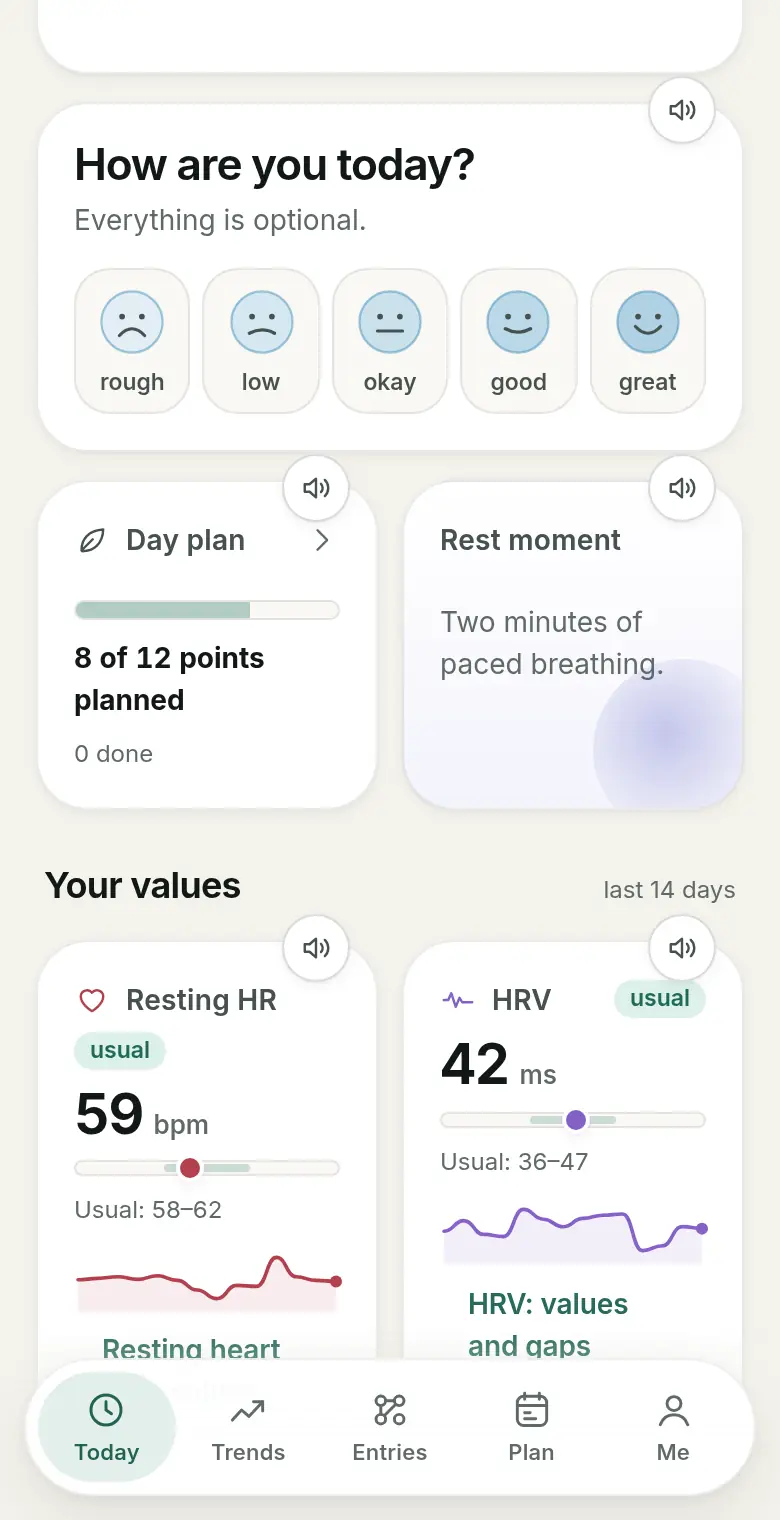
The mypacing check-in records how you feel for a day. All entries are optional: how you feel, sleep feeling, mental load, rest time and tags. You do not need a smartwatch for your own entries. They complement available measurements. Use an account for real entries; the demo uses made-up values.
mypacing combines an optional wellbeing check-in with your own day plan with energy points in one app. You choose the tasks and points, and set your daily budget yourself. The app adds up the points and shows your plan.
Can I use the check-in without a smartwatch?
Yes. Your own entries do not require a smartwatch or imported measurements. You can record how you feel in the iPhone or Android app. Additional values from connected data sources complement your check-in; they are not a requirement for it.
This is useful if you do not wear a watch, are charging it or have gaps in your measurements. A missing measurement is not an answer to a check-in question. You do not need to replace it with a guess. Your own observation remains your own entry, even without a complete series of measurements.
To get to know mypacing, open the demo with made-up values. It shows the interface without an account. Do not enter personal information there. Sign in to your own account in the iPhone or Android app to keep real entries.
How do I record how I feel?
- Open Today: Open the check-in for the current day. In a real account, entries belong to that account; the demo is a view with made-up values.
- Choose your wellbeing: Choose the level that best describes your day overall. You do not need to look up measurements first.
- Add details if you wish: Under “More details (optional)”, you can add sleep feeling, mental load and rest time. Leave out anything you do not want to answer right now.
- Save and read the message: Check whether the app confirms the check-in as saved or only queues it on this device. A queued entry has not yet been confirmed by the server.
All entries are optional. You do not have to keep a complete report of every day. If the app displays an error, read the message and try saving again if needed. Your selection in the open check-in remains available when saving fails.
Four questions, all optional
- Wellbeing: “How are you overall today?” Five levels from very rough to very good.
- Sleep feeling: “How did your sleep feel?” Restless, so-so or restful.
- Mental load: “How much was on your mind today?” From barely to very much. This covers focus, conversations, appointments and worries.
- Rest time: “How long did you rest during the day?” From under one hour to more than six hours, with or without sleep.
All questions are optional; you can add details later. Older check-ins can no longer be changed. That keeps your entries comparable.
Your own answers add what watches do not measure
Depending on the device and permissions, a watch can record values such as pulse, sleep duration or steps. How demanding a conversation felt to you is your own observation. Apple also describes manual input: Health on iPhone and Mindfulness on Apple Watch let you record momentary emotions and daily moods.
The mypacing check-in is a separate feature. The manufacturer sources explain Apple’s logging options; they do not establish a partnership or an import of those entries into mypacing. You do not need to complete your check-in within a fixed time.
Tags mark special days
You can add tags to your check-in, such as “tense”, “calm” or “travel”. These are your own observations. Under Entries you later filter by them yourself and see the matching days.
Your history shows answers and measurements side by side
In your history, mypacing shows wellbeing and mental load from your answers next to resting heart rate, HRV, sleep and steps. The app does not calculate a stress score from your answers. It puts the information side by side, and you draw your own conclusions.
You can download your entries as a file at any time or delete them together with your account.
Frequently asked questions about the check-in
Do I have to answer all four questions?
No. All entries in the check-in are optional. Sleep feeling, mental load and rest time are optional. Open the optional section to add details; an empty field is not a poor rating of your day.
Can I change a check-in later?
You can change a check-in and add optional details while it is shown as editable. Older check-ins are locked. The app then displays a message; you cannot force editing through that view.
What does “queued on this device” mean?
The app has queued your check-in on this device for a later transfer. The server has not confirmed it yet. Do not treat a queued entry as a confirmed copy in your account; check its displayed status later.
Are tags required or an automatic assessment?
No. Tags are optional observations of your own. Choose only terms that are useful to you. The app does not turn a tag into a diagnosis or calculate a stress score from your answers.
What if my feeling and measurements do not match?
They remain different perspectives on the same day. A measurement does not automatically explain how you feel. First check whether the data is complete and which period it describes. Showing values together does not establish a cause or tell you what to do.
Can I download or delete my entries?
Yes. You can download your entries as a file or delete them together with your account. Before deleting, consider whether you want to keep your own copy. See the legal and privacy information for details of data processing.
For ways to use your own observations when planning, see energy points and your day plan. Details about processing your data are in the privacy information.
Sources
The feature description was checked against the deployed mypacing web app and its corresponding source on 22 October 2026. The manufacturer sources below explain only Apple’s manual state-of-mind logging. They are not a review or endorsement of mypacing. These linked sources are in German.
- Gemütszustand in der App „Health“ auf dem iPhone protokollieren, Apple Support. Accessed 22 October 2026.
- Gemütszustand auf der Apple Watch protokollieren, Apple Support. Accessed 22 October 2026.
Read more
Pacing diary
What to record in a pacing diary, a simple template, and paper versus app.
Reading sleep data
What watches measure during sleep and what they estimate, and why sleep duration in your own history says more than a single night.
Effort and recovery in exam season
Plan revision blocks and breaks, note your mental load and know the time off for exams during an apprenticeship.
Pacing in everyday life
What pacing means, which questions help when planning, and why looking across several weeks shows more than a single day.
Tags and comparing days
Use your own journal tags and compare wellbeing on days with and without a tag.
Marking period days
Mark period days yourself and see them in the calendar, in trends and when comparing wellbeing.
See mypacing: The demo shows the daily picture, history and day plan with made-up values – no account needed. More on the home page.
mypacing is not a medical device. The app shows your own values and notes over time. It does not make diagnoses, give treatment recommendations or replace medical advice.
The app is free on the App Store for iPhone and iPad and on Google Play for Android.
Publisher: SIGAtech Softwareentwicklung, responsible for content: Siegfried Gaier (legal notice). First published on 20 October 2026. Content revised on 10 November 2026.